Online booking for sports venues: end the phone tag
A practical guide to setting up online booking for sports venues — what a converting booking page needs, how to take payment upfront, and the policies that stop disputes before they start.
On this page
What phone-and-DM bookings really cost
Picture a Tuesday evening at a five-court venue. The phone rings twice during a party changeover, a regular texts asking if 7pm Thursday is free, and someone's left a voicemail about a birthday booking that nobody's heard yet. None of it gets answered until the front desk clears — by which point the caller's already tried the venue down the road. That's not a staffing problem. That's what happens when online booking for sports venues isn't in place, and every request has to pass through a person before it can be confirmed.
Phone and DM bookings feel manageable when volume is low, which is exactly why the cost is easy to miss. Each enquiry needs someone available to answer it, someone who knows current availability off the top of their head or is willing to go check, and someone to follow up if the caller doesn't commit on the spot. Multiply that by forty or fifty enquiries a week and you're running an informal call centre on top of actually operating the venue. Double-bookings creep in because two staff members took requests for the same slot an hour apart. Casual hire slips through the cracks on a busy Saturday because nobody had a spare minute to text back. And every one of those missed replies is a customer who's now checking whether a competitor answers faster.
The deeper cost is timing. Most enquiries about court or field hire don't arrive during business hours — they arrive at 9pm when someone's planning next week's social game, or during a lunch break when a parent's booking a party. A venue that can only take bookings by phone is, in practice, closed most of the time a customer actually wants to book. Moving to a real booking page for sports venues doesn't just save staff time; it captures demand that's currently going nowhere at all.
What customers now expect
Anyone who's booked a haircut, a restaurant table or a doctor's appointment in the last few years has an internalised expectation: check availability, pick a time, pay, get a confirmation — all without speaking to a human. Sports venue hire is judged against that same bar now, whether the comparison is fair or not. A customer who has to call during business hours, wait for someone to check a paper diary, and then call back to confirm doesn't experience that as quaint or personal. They experience it as friction, and friction is exactly what sends them looking elsewhere.
This matters most for the bookings you're not currently seeing at all — the impulse booking at 10pm, the interstate visitor trying to lock in a session before a work trip, the parent booking a party while the kids are finally asleep. None of that demand converts if the only path to booking runs through office hours and a phone call. A venue that accepts bookings online isn't chasing a trend; it's simply open for business at the times its customers are actually deciding to book.
There's a trust dimension too. A booking page that shows real availability, takes payment securely and sends an instant confirmation reads as a well-run operation before a customer has ever set foot on site. A booking process that ends with "someone will call you back to confirm" reads as uncertain, even if the venue behind it runs beautifully. First impressions for a sports facility increasingly happen on a screen, not at the front counter.
Anatomy of online booking for sports venues that converts
A sports venue booking page that actually converts enquiries into confirmed, paid bookings shares a handful of features, regardless of sport or venue size.
Real-time availability is the foundation. If a court or field shows as free, it needs to be free — reading off the same calendar staff use, not a separate system that's updated once a day. Nothing kills trust faster than a customer completing a booking only to be told later that the slot was actually taken.
Clear categories matter next. Casual hire, recurring bookings, parties and open games are different products with different rules, and a booking page that lumps them together confuses people who just want to book a Thursday night social game without wading through party package options. Filtering by sport, court type or session length helps a lot on multi-court, multi-sport venues.
Minimal steps to confirm is the third piece. Every extra click or form field between "I want this slot" and "it's booked" loses a percentage of people who started the process. The best booking pages get someone from browsing to a paid, confirmed slot in well under a minute, on a phone, without creating an account first if that can be avoided.
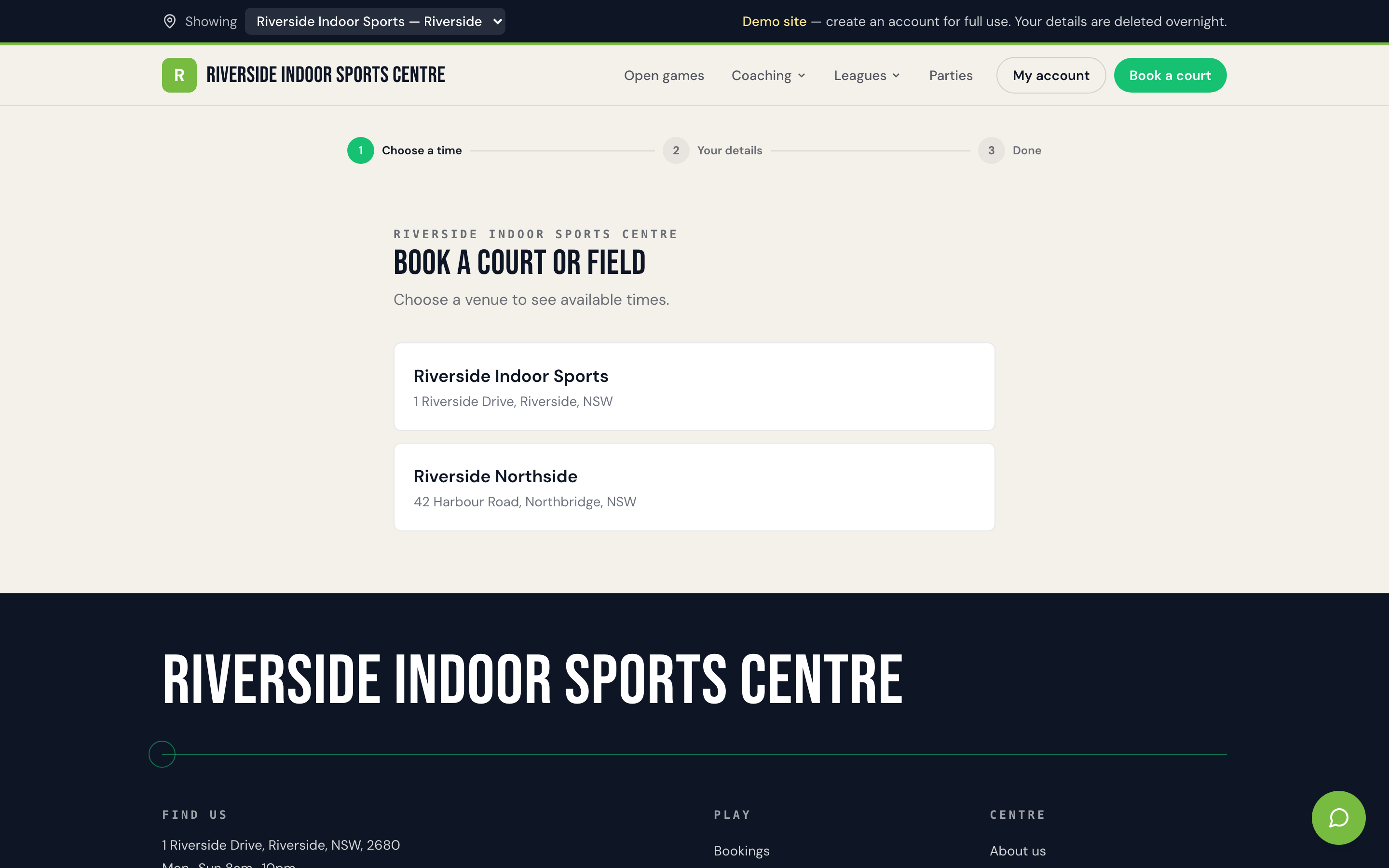
Mobile-first design isn't optional. Most bookings happen on a phone, often one-handed, often while doing something else. A page designed for a desktop screen and shrunk down loses people at exactly the moment they're ready to commit. And instant confirmation — a receipt, a calendar-ready confirmation, no "we'll be in touch" — closes the loop and removes the anxious wait that makes people call to double-check anyway, which defeats the point of taking it online in the first place.
If you're still mapping out what a full booking system needs to cover before you build or buy one, our court booking system guide goes deeper on the mechanics — recurring slots, multi-court calendars, and how casual hire and programs share the same courts without colliding.
Taking payment upfront
A booking page without payment attached is really just a fancier enquiry form. It removes the phone call, but it doesn't remove the chasing — you've just swapped "please call to confirm" for "please pay before Thursday," and someone still has to follow up when that doesn't happen.
Taking payment at the moment of booking changes the shape of the problem entirely. A slot isn't provisionally held on trust; it's paid for, or it's not booked. That single change removes most of the admin that phone-and-DM booking generates — no more tracking who's paid, no more awkward reminder texts, no more slots quietly going unpaid until someone notices at the till on the day.
In practice that means accepting card payments, Apple Pay and Google Pay natively at checkout, plus Afterpay or Zip where you've chosen to offer them — letting customers pay in whatever way they already use for everything else online, rather than routing them through a separate invoice or bank transfer that adds a day's delay and a chance for the booking to fall through entirely. Deposits and full payment both have their place depending on your venue — a small deposit can lower the barrier for first-time bookers, while full payment upfront suits venues that have been burned by no-shows. Either way, the payment needs to happen inside the same flow as the booking, not as a follow-up step.
If pricing structure itself is the thing you're still working through — deposits versus full payment, peak versus off-peak rates, how to price parties differently from casual hire — our guide on getting paid upfront for court hire covers the policy side in more detail. Sweepa's booking and payments features handle the mechanics — Stripe-native checkout built into the booking flow itself, so payment isn't a separate system bolted on afterwards.
Policies that prevent disputes
Taking bookings and payment online surfaces questions that a phone conversation used to paper over informally. What happens if it rains. What happens if someone needs to reschedule. What happens if a card gets charged and the customer disputes it later. Get these written down before you go live, not after the first awkward refund conversation.
A cancellation and reschedule policy needs to answer, in plain language a customer can read in ten seconds: how much notice is required, whether a reschedule is free or a cancellation incurs a fee, and whether refunds are cash, credit, or not offered past a certain cutoff. Put it on the booking page itself, not buried in a terms link nobody opens.
A wet-weather or venue-closure policy matters for outdoor courts and fields especially — who makes the call, by when, and what happens to bookings caught by it: automatic reschedule, credit, or refund. Customers are far more forgiving of a cancelled session than of an unclear one, so the clarity matters more than the specific rule you land on.
No-show handling deserves its own line, particularly once payment is upfront — does a no-show forfeit the booking fee, or is there a grace period. And a plain disputes process — who to contact and how a payment issue gets resolved — heads off the handful of chargebacks that inevitably show up once you're processing card payments at volume. None of this needs legal language. It needs to be short, honest, and visible before someone pays, not discovered afterwards when they're frustrated.
Go-live checklist
Before flipping the switch on a public sports venue booking page, run through this:
- Availability is accurate — every court, field or session type reflects real capacity, with no gaps between what staff see and what customers see.
- Categories are set up cleanly — casual hire, recurring bookings, parties and open games each have their own clear path, not one generic form.
- Payment methods are live and tested — card, Apple Pay, Google Pay, and Afterpay or Zip if you're offering them, with a real test transaction run through end to end.
- Cancellation, reschedule and wet-weather policies are written and visible on the booking page itself, in plain language.
- Confirmations are automatic — email and, ideally, SMS, sent the instant a booking and payment complete, with no manual step in between.
- Mobile is checked, not assumed — book a real slot from a phone before launch and see where it's clunky.
- Staff can see it too — whoever's on the front desk needs the same live calendar customers are booking from, so nobody's cross-checking two systems on a Saturday changeover.
Get those seven right and the phone stops being the default booking channel — it becomes what it should have been all along, a backup for the handful of people who genuinely prefer to talk it through.
FAQ
How long does it take to set up online booking for a sports venue?
With the courts, sessions and pricing already decided, a straightforward setup can go live in days rather than weeks — most of the time goes into getting availability and pricing right, not the technical setup itself. Multi-location or multi-sport venues with more complex scheduling take a little longer to configure properly.
Do I need a separate payment provider to take bookings online?
No — a good booking platform should have payments built into the booking flow itself, rather than routing customers off to a separate checkout or invoice. Sweepa uses Stripe-native payments, so card, Apple Pay, Google Pay and Afterpay/Zip (where enabled) all sit inside the same booking step.
What if a customer still wants to book by phone?
That's fine — an online booking page doesn't have to be the only channel, it just needs to be the default one. Staff can still take a phone booking and enter it into the same system, so it shows as taken on the calendar everyone else is booking from, rather than living in a separate paper diary.
Should I take a deposit or full payment for court bookings?
It depends on your venue and how much of a problem no-shows have been. Full payment upfront removes almost all payment-chasing admin, while a smaller deposit can lower the barrier for first-time or casual bookers. Either approach works as long as it's applied consistently and stated clearly before checkout.
How do I handle wet weather or venue closures for online bookings?
Set the policy before you launch, not after the first washout: who makes the closure call, by what time, and whether affected bookings are automatically rescheduled, credited or refunded. Publish it on the booking page so customers see it before they pay, and communicate the actual call quickly by email or SMS when it happens.
Will an online booking page reduce no-shows?
Taking payment at the time of booking is the single biggest lever for reducing no-shows, since there's a real cost to not turning up rather than just a forgotten phone reservation. Automatic reminder messages ahead of the session help too, particularly for bookings made well in advance.