Multi-Location Venue Management Without Cloning Yourself
A practical look at multi-location venue management: what actually breaks when you open a second site, and the systems franchise and multi-site operators need in place before they add a third.
On this page
What breaks at site number two
Running one venue well is hard enough — bookings that don't clash, payments that land on time, a wet-weather call that reaches everyone before they're standing at a locked gate. Open a second site and the assumption is simple: same job, twice the size. That's rarely how it plays out. The moment a second location goes live, most operators discover that multi-location venue management isn't the same job scaled up — it's a genuinely different problem, and the systems that carried one site rarely survive contact with two.
The cracks show up fast. Two logins that don't talk to each other, so a regular who usually books at the CBD site turns up confused when their history doesn't seem to exist at the new suburban courts. A wet-weather call made independently at each site — sometimes by different people, using different judgement — so one location closes and the other stays open on the same rainy Tuesday, and both decisions get questioned. Payment reconciliation done twice by hand, once per spreadsheet, with two sets of numbers that never quite add up to the total sitting in the bank account. And you, the operator, become the connective tissue between sites — the person both managers text when they need to know what's happening twenty minutes down the road, because nothing else tells them.
None of that is a staffing problem or a discipline problem. It's what happens when single-site tools get asked to do a multi-site job. The real test of multi-location venue management isn't whether you can open a second site — plenty of operators manage that on sheer effort. It's whether you can run both without spending your own attention as the thing that holds them together.
One brand, many locations: the core of multi-location venue management
Customers shouldn't have to think about which entity they're dealing with — to them, it's one business that happens to have more than one address. That means one consistent booking experience, one brand voice, one set of policies about cancellations and refunds, regardless of which site someone lands on. But it also means each site genuinely differs: different court types, different capacity, different opening hours, sometimes different local pricing. A setup that forces every site to look identical papers over real differences; one that lets every site build its own website from scratch loses the brand consistency that made people trust you at site one in the first place.
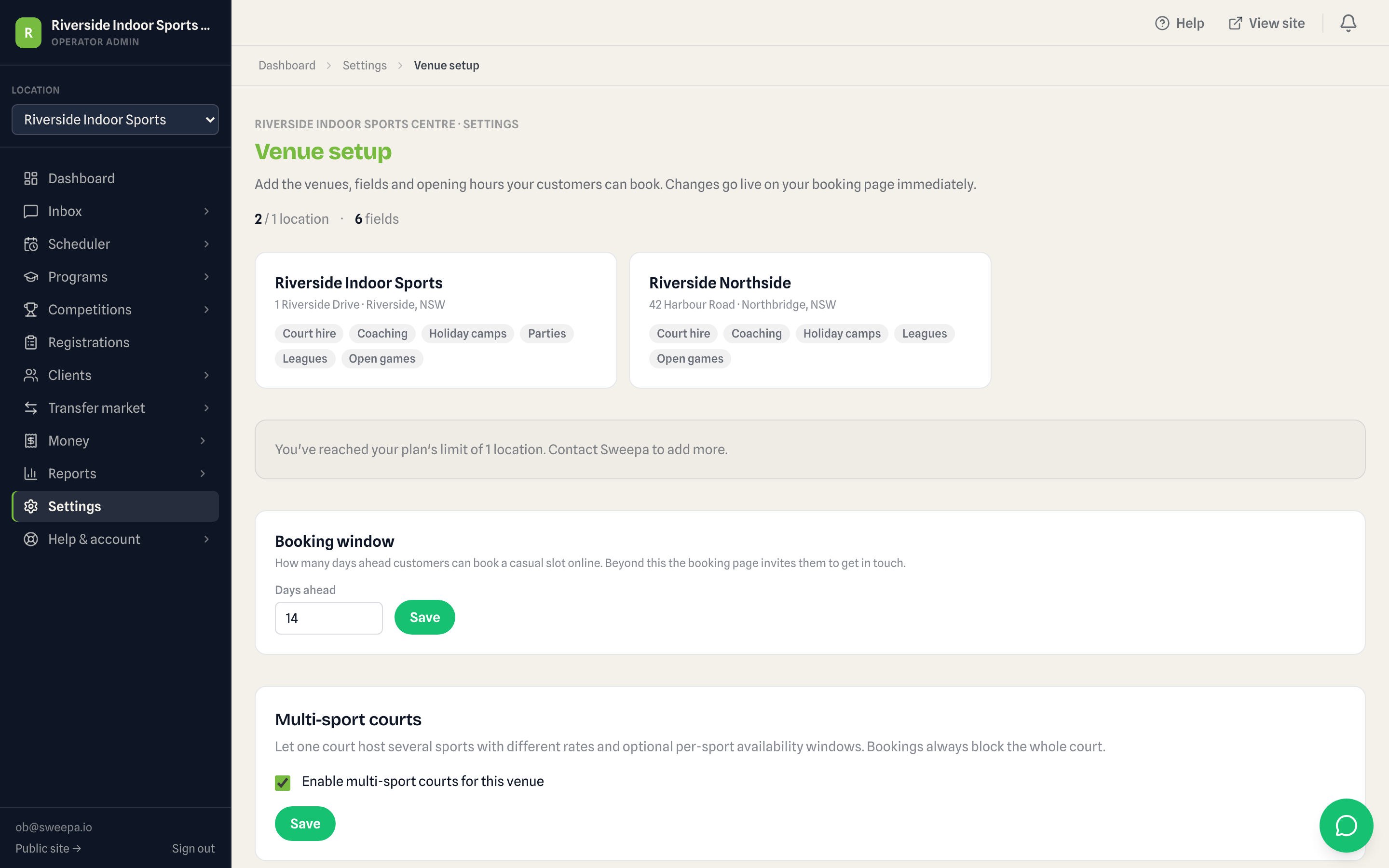
The middle ground is a branded site structure where the shell — logo, colours, booking flow, policies — stays constant, and each location gets its own section: its own courts, its own hours, its own live availability, all under one domain rather than three unrelated web addresses. That's the model behind a branded {slug}.sweepa.io site with an optional custom domain — one branded home, section-based configuration per location, so a new site can go live without anyone building a website for it from scratch. It's a small detail that matters more than it sounds: the second and third site inherit the brand's credibility instead of starting from zero.
Central vs local decisions
Every multi-site operator eventually has to draw a line between what head office controls and what each site manager decides on the spot, and getting that line wrong in either direction causes real damage. Draw it too far toward central control and site managers wait on approval for things they could have handled themselves at 8am on a Tuesday — a small local promotion, a one-off room swap for a birthday party. Draw it too far toward local autonomy and you end up with three sites running three different cancellation policies, three different tones in their booking confirmations, and a franchise brand that doesn't feel like one brand at all.
A workable split, in our experience: keep brand voice, payment processing, invoicing format, communication templates and compliance policy centralised — these are the things customers and regulators actually notice when they're inconsistent. Leave opening-hours nuance, court-specific house rules, local partnerships and day-to-day rostering with the site. Councils running multiple rec centres and franchise groups adding a second or third location both hit this same fork; the operators who handle it well aren't the ones with the most rules, they're the ones who've been deliberate about which decisions genuinely need to travel up the chain and which don't.
Pricing per site
A multi-site sports facility almost never wants identical pricing across every location, and shouldn't have to fake it. A CBD site with tight peak-hour demand can carry a different rate card to a suburban site chasing off-peak volume — that's not brand inconsistency, that's reading each market correctly. What does need to stay consistent is everything downstream of the price: one invoicing identity under the operator's own prefix, one Stripe-native payment setup across every location (card, Apple Pay, Google Pay, and Afterpay or Zip where enabled), and one clear view of what's owed, site by site, without your bookkeeper having to reconcile two separate invoice sequences at the end of the month.
A two-site operator we've worked with ran meaningfully different peak pricing at each of their locations for close to a year before realising their finance admin didn't need to be different too — once both sites sat on one invoicing sequence and one payment setup, the pricing stayed local but the reconciliation stopped being a monthly headache. If you haven't settled your pricing logic yet, how to price court and field hire is worth reading before you lock in a rate card across more than one site — it's easier to set sensible per-site pricing once than to unwind an inconsistent one later.
Roles and access
Good franchise sports venue software starts from a simple principle: access should match responsibility, not whoever happens to know how to find the right spreadsheet tab. A head office owner needs visibility across every site — revenue, occupancy, outstanding payments, the lot. A site manager needs full control of their own location and, usually, no reason to see the internals of a site they don't run. A casual staff member covering a Saturday shift needs the day's bookings and payment status in front of them, and nothing else.
This is where staff and client mobile apps earn their place — a duty manager checking tomorrow's roster from their phone at home, a franchise owner glancing at this week's occupancy across three sites between meetings, without either of them needing desk access to "the system." On the customer side, a client portal lets hirers and program parents manage their own bookings, payments and details without calling either site directly — which matters more, not less, once there's more than one phone number a confused customer could ring.
Reporting across sites
The moment you're running more than one location, the question stops being "how did we do" and becomes "how did each site do, and where should the next dollar of attention go." That's a different reporting job. Exporting each site's numbers separately and pasting them into a master spreadsheet by hand is exactly the kind of manual step that quietly stops happening once things get busy — which means the comparison that would actually help you (this site's occupancy is falling, that site's off-peak slots are empty three afternoons a week) never gets made.
One rolled-up view — revenue, bookings, occupancy, outstanding payments, side by side by site — turns that into something you can glance at rather than assemble. It's also where transparent, plan-based platform fees matter: knowing exactly what each site costs to run on the system, without hidden per-transaction surprises, makes the site-by-site comparison honest rather than distorted by fees you can't see. We've written more broadly about what fragmented reporting actually costs operators in the cost of disconnected tools, if that's the piece of the multi-site puzzle biting hardest right now.
The systems checklist
Worth saying plainly: none of this is worth the complexity if you're only ever going to run one site. A single-location tool will always feel lighter for a single location, and there's no reason to carry multi-site machinery — role hierarchies, cross-site reporting, franchise-level settings — you don't need yet. Multi-location venue management earns its keep specifically at the point where a second address stops being a nice problem to have and starts being the thing eating your Sundays.
If that's where you are, here's what's worth checking before you commit to any platform, ours included:
- One login that covers every site, not a separate account per location
- A consistent, branded booking experience across sites under one domain
- Site-level pricing with centrally consistent invoicing and one payment setup
- Role-based access that matches real responsibility, from franchise owner down to casual staff
- Reporting that rolls up automatically, without anyone manually reassembling it each month
- Central control over brand, policy and compliance without head office approving every local decision
Get those six right and adding a third site, then a fourth, stops being a project and starts being a checkbox. That's really the whole difference between a multi-location business and a business that just happens to have opened twice — and if you're weighing up whether now's the moment to bring in a platform built for it, our pricing page breaks down what's included at each plan level, including where multi-location support kicks in. For the fuller story of why we built it this way, we've written about that separately in why we built Sweepa.
FAQ
How many locations can one account manage?
It depends on your plan — Sweepa supports multiple locations on one account, with the exact number of sites tied to plan level. If you're weighing up a second or third site, check current plan limits on the pricing page before you commit to a structure.
Can each site have its own pricing?
Yes — pricing is set at the site (and often the court or program) level, so a CBD location and a suburban location can run genuinely different rate cards. What stays consistent across sites is the invoicing format and payment setup, so different pricing doesn't mean different bookkeeping.
Can a site manager see only their own location?
Role-based access is built for exactly this — a site manager can be scoped to their own location's bookings, roster and payments, while a franchise owner or head office role sees everything across every site. Casual staff can be scoped even more narrowly, to just the day's bookings.
Do all locations need to share one website, or can each site have its own?
One branded site with a section per location is the more common and more effective structure — customers get one consistent brand experience, and each location's section carries its own hours, courts and availability. Running entirely separate websites per site tends to fragment the brand and duplicate admin for no real benefit.
What's the difference between multi-location venue management and franchise venue management?
In practice they overlap heavily. "Multi-location" usually describes one operator running more than one site directly, while "franchise" adds a layer of semi-independent site owners or managers operating under one brand. Both need the same underlying split: centralised brand, payments and reporting, with local control over day-to-day site decisions.
When does a business actually need multi-location software, rather than running each site separately on its own tools?
The usual tipping point is when reconciling numbers across sites, or answering a simple cross-site question, starts taking real time each week — pasting exports into a master spreadsheet, chasing a second login, or texting a manager to check availability at another site. Below that point, running two sites on separate simple tools can still work fine.
Is multi-location venue management only relevant to franchises?
No — councils operating several rec centres under one department, and independent operators who've simply grown to a second or third venue, hit the same problems as formal franchises. The label matters less than the shape of the problem: more than one site, one brand, and a need for both central consistency and local flexibility.