Sports Parent Communication: Emails and SMS That Actually Get Read
A practical guide to sports parent communication — when to use email versus SMS, the five messages every coaching program needs, and how to handle a wet-weather call without losing parents' trust.
On this page
Why sports parent communication goes missing
Every coach has had this moment: half the group turns up to Saturday's session without boots, or without the memo that it moved to the other oval, and the other half didn't show at all because nobody told them it was still on. It's rarely because parents don't care. It's because sports parent communication usually competes with the school newsletter, the class WhatsApp group, two other kids' activities and a work inbox that never empties. An email sent on Tuesday at 10am is dead on arrival for most parents — it's buried by pickup time.
The fix isn't sending more. It's sending the right message, on the right channel, at the right moment, written so it can be read in the five seconds a parent actually has for it. That's the whole discipline covered in this post — not a marketing platform, just getting the message that matters in front of the person who needs it.
Email vs SMS: which for what
Email and SMS aren't interchangeable — they do different jobs, and mixing them up is the most common mistake we see.
Email is for anything with detail or that needs to be found again later: registration confirmations, term calendars, what-to-bring lists, invoices, end-of-term wrap-ups. Parents archive email without thinking about it, and they'll go looking for it in their inbox when they need the address for Saturday's carnival three weeks from now.
SMS is for anything time-sensitive or short: "Session moved to Court 2," "Cancelled due to rain," "Rego closes Friday — two spots left." SMS gets read. Open rates on text messages are dramatically higher than email, and they're read within minutes rather than hours, which is exactly what you want when a decision needs to land before 4pm changeover.
A rough rule that holds up across most programs: if it needs to be understood in under ten seconds and acted on today, it's SMS. If it needs to be kept, referred back to, or has more than two pieces of information in it, it's email. Programs that get this backwards — long detail-heavy texts, or urgent one-line changes buried in an email subject line — are the ones parents tune out.
The five messages every program needs
Most of what actually needs to reach parents falls into five categories. Get these right and the rest is optimisation:
- Registration and enrolment confirmation — what they've signed up for, when it starts, what it costs, sent the moment payment clears.
- The welcome and what-to-bring message — sent a few days before the first session: location, parking, uniform or footwear, and who to contact on the day.
- Schedule changes and reminders — a day-before nudge for the first week or two while the routine is new, and immediate notice any time a session moves, starts late or gets cancelled.
- The wet-weather or cancellation call — covered properly below, but it deserves its own line because getting this one wrong is what actually costs you trust.
- End-of-term wrap-up and re-enrolment — how the term went, any results or presentation details, and a clear, easy next step to lock in the following term before the family drifts to whatever else is competing for the calendar slot.
Programs that only send the first one — the confirmation — and go quiet until the term ends are leaving the other four opportunities on the table, and those are the messages that actually keep families enrolled and coming back.
Writing for the school-pickup skim
Assume every message is being read one-handed, in a school car park, with a kid tugging at a sleeve. That's not a figure of speech — it's close to the literal reading conditions for most of these messages, and it should shape how you write every one of them.
Put the decision or the action in the first line, not the third paragraph. "Training's on tonight, wet weather sorted — see you at 4:30" beats a warm opening line followed by the actual news halfway down. Use the subject line (email) or the first few words (SMS) to carry the headline, because that's often all that gets read before a parent decides whether to open the rest.
Cut anything that isn't the point. A friendly tone doesn't require padding — one clear sentence reads as more competent than three vague ones. If a message needs a phone number, a location or a start time, put those on their own line so they're scannable, not buried mid-sentence. And say who it's for: "Under-10s only" at the top of a message saves a dozen "does this apply to my kid?" replies.
Timing: when messages actually land
The best-written message still fails if it lands at the wrong time. A few patterns that hold up across most programs:
- Morning send, evening read. For anything non-urgent, sending between 7am and 9am means it's sitting in the inbox when parents check their phone properly that evening — better than a mid-afternoon send that gets buried under work email.
- Day-before reminders, not day-of. A reminder the evening before gives a parent time to actually organise gear, a lift or a lunchbox. A reminder the morning of is often too late to change anything.
- Urgent changes go out the moment you know, not on a schedule. If a session's cancelled, that message goes the second the call is made — not batched with tomorrow's newsletter.
- Avoid the school-hours dead zone. Messages sent between roughly 9am and 3pm on a school day often just sit unread until pickup — fine for non-urgent info, useless for anything needing a same-day response.
The wet-weather call: what actually has to happen
This is the moment sports parent communication either earns trust or burns it, so it's worth walking through exactly what has to happen, because "just send a message" undersells how tight the sequence really is.
The call itself needs to be made early enough that parents can still change their plans — for an afternoon session, that usually means a decision by lunchtime at the latest, not five minutes before the first kid is due on site. Once the call's made, the message has to go by SMS first, because email won't be read in time by everyone who needs it, and it has to go to every family enrolled in that session, not just the ones who happen to be on a group chat. It needs three things and nothing more: what's happening (cancelled, moved indoors, delayed), where to go instead if anything's changed, and who to contact if there's a question. Coaches on the ground need to know at the same time as parents do, not after — nothing undermines the call faster than a coach standing at an empty court unaware it's been called off.
The follow-up matters almost as much as the call itself: a short note afterwards on what happens next — a makeup session, a credit, or simply "see you next week" — closes the loop so parents aren't left wondering whether the term's been quietly shortened. Get the sequence right consistently, over a season, and it becomes one of the things that makes a program feel genuinely well run, in a way glossy marketing never will.
Templates and sensible automation
None of this needs to be reinvented every week. Build a template for each of the five core messages once — confirmation, welcome, reminder, cancellation, wrap-up — and reuse it with the details swapped in for each new term or session. That's the leverage: writing the good version once, not writing a good version every time under time pressure.
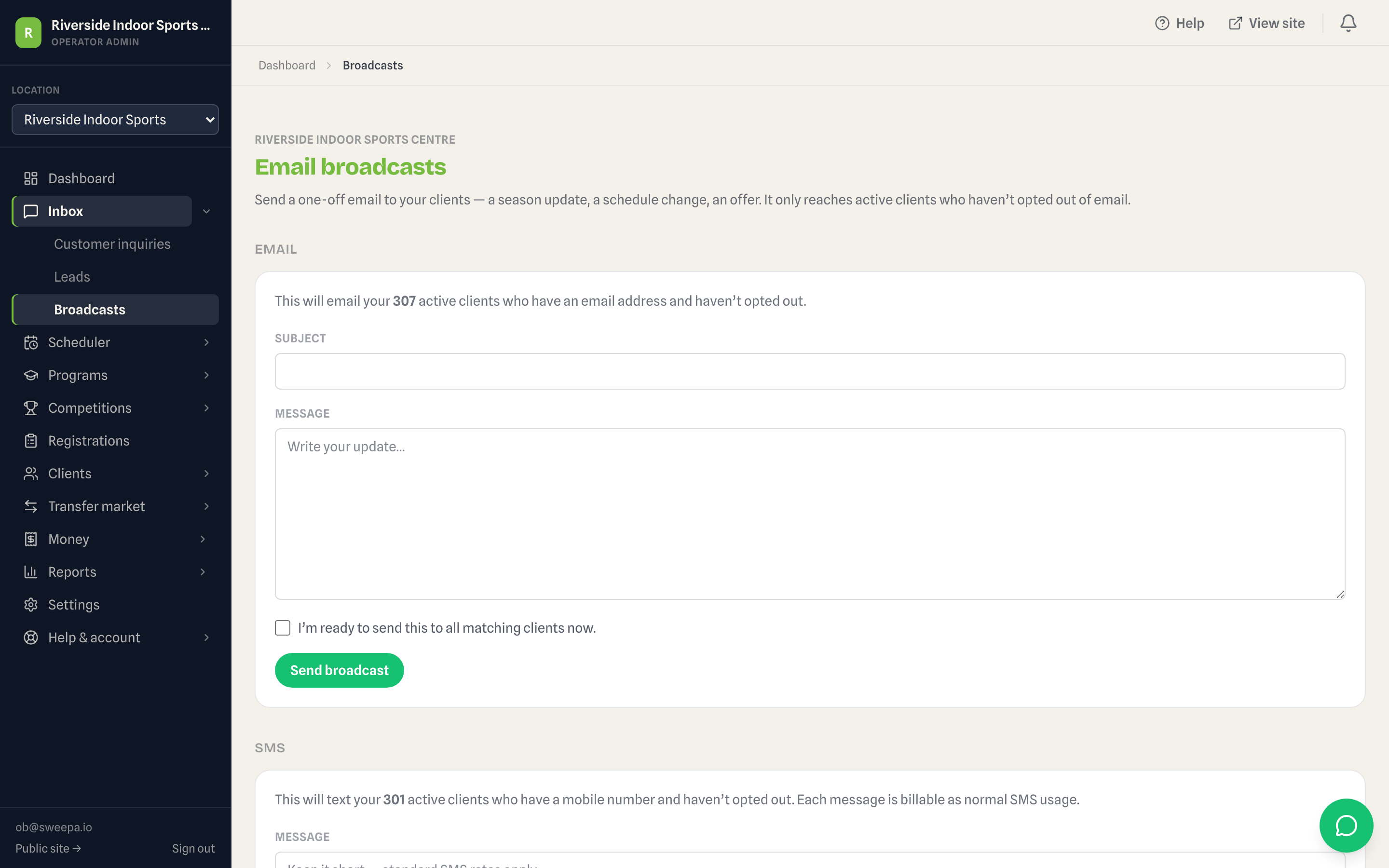
Scheduling matters more than automation. A day-before reminder can be scheduled the moment a term calendar is locked in, so it goes out on time whether or not anyone remembers on the day. Sweepa's email and SMS communications work this way — templated messages you send to a group or schedule ahead, not a marketing automation platform running its own campaigns, and not something that posts to social media on your behalf. It's the equivalent of a well-organised admin doing the sending, not a system deciding what to say.
Keep it that grounded. The value isn't in cleverness — it's in the wet-weather message reliably going out to the right group inside the right window, every single time, without depending on someone remembering to do it manually at 7am on a Saturday.
What not to send
More messages is not the same as better sports parent communication, and it's worth being just as deliberate about what you leave out.
Don't message for the sake of it — a weekly "just checking in" with no actual news trains parents to stop opening your messages, which costs you exactly when you need to be heard. Don't bury the actual point of a message under enthusiasm or filler; if the news is a cancellation, lead with the cancellation. Don't send urgent, time-sensitive information by email alone — if a decision needs to be made or acted on today, it needs SMS in the mix. And don't over-promise on personalisation: a templated message addressed to the right group, sent at the right time, beats a laboured attempt to sound like it was typed individually to each family.
If you're running school holiday sports camps or a term coaching program, the same five-message structure applies whether it's a one-week camp or a ten-week season — just compress the timeline. And comms don't stand alone: pairing reliable messaging with solid coaching attendance tracking means you always know exactly which families a wet-weather message or a re-enrolment nudge actually needs to reach, rather than blasting the whole database and hoping.
Good sports parent communication isn't about volume or polish. It's about five messages, sent through the right channel, arriving at the moment they're actually useful — reliably enough that parents stop needing to double-check with you at all.
FAQ
Should sports programs use email or SMS for parent communication?
Use both, for different jobs. Email suits anything with detail that a parent might need to find again later — confirmations, calendars, invoices. SMS suits anything short and time-sensitive, like a session change or a wet-weather cancellation, because it gets read within minutes rather than sitting in an inbox until the evening.
How far in advance should reminder messages go out?
A reminder the evening before a session gives parents time to actually organise gear or a lift. A reminder sent the morning of is often too late to change anyone's plans, so it's best used alongside the day-before message, not instead of it.
How quickly should parents be told about a wet-weather cancellation?
As early as the decision allows — for an afternoon session, that generally means a call by lunchtime, not minutes before the first kid arrives. The message should go by SMS first to reach everyone in time, cover what's happening, where to go instead if anything's changed, and who to contact.
Is it okay to use templated messages for parent communication?
Yes — a well-written template sent to the right group at the right time reads as more reliable than a rushed individual message, not less. Build one solid version of each core message once (confirmation, welcome, reminder, cancellation, wrap-up) and reuse it rather than writing from scratch under time pressure.
Does Sweepa post messages to social media automatically?
No. Sweepa's communications are templated and scheduled email and SMS sends to your registered families — not a marketing automation platform and not a social media auto-posting tool. It's built to get the right message to the right group reliably, nothing more.
How often should a coaching program message parents?
Only when there's something to say. The five core messages — confirmation, welcome, reminders, cancellations, and end-of-term wrap-up — cover most of a season. Sending for the sake of it trains parents to stop opening your messages, which costs you when something actually urgent needs to land.